Tag: design

  • Design-For-Use: Ray and Charles Eames

    Design-For-Use: Ray and Charles Eames

    Ray Kaiser Eames was key figure in the New York art scene, who later collaborated with her husband, Charles Eames, an architect, in the design of architecture, textiles, film, furniture, and graphic art. Their creative partnership was responsible for groundbreaking contributions in design. They are best known for their furniture design, innovations in industrial design and manufacturing such as wood molding to produce furniture, and the photographic arts.

    Ray and Charles Eames

    “Design is a plan for arranging elements in such a way as best to accomplish a particular purpose.”

    ~ Charles Eames

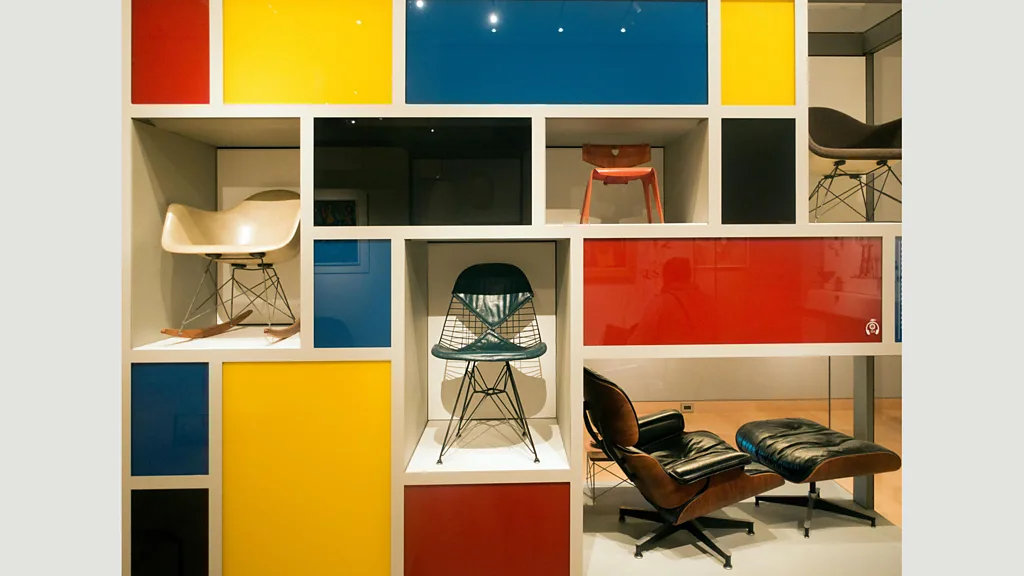
    Charles and Ray Eames are among the most important American designers of the 20th century. They created what is now known as “midcentury style” in furniture and architecture. They experimented with new forms of aesthetic design, creating Mondrian-inspired storage and avant-garde furnishings.

    Their work on molded wood furniture followed a project to develop a leg splint for wounded soldiers during WWII, for which they used layers of bent plywood. They developed techniques for bonding layers of wood veneer together using resin glue, then shaping the wood into the required form using heat and pressure. This process was developed in later collaborations with furniture makers Herman Miller and Vitra to create iconic designs such as the Eames Lounge Chair (bottom-right in the image above).

    We celebrate Eames’ designs because they were innovators, but also because they combined visual innovation with functionality and ease-of-use. When presented with a need – or an opportunity – they developed ways of using new materials to produce designs that were scalable (for manufacturing), visually-pleasing, and comfortable. There is no point in producing a design that does not fit a need – or that is difficult to use even when it does.

  • Why Is Design Improvisational?

    Why Is Design Improvisational?

    The focus of IS design has moved “upstream” of the waterfall model, from technical design to the co-design of business-processes and IT systems.  This focus requires an improvisational design approach.  IT-related organizational innovation deals with wicked problems.  Wicked problems tend to span functional and organizational boundaries as business process and information management problems are intertwined.  There are clusters of interrelated problems:  these cannot be defined objectively because the problem is defined differently, depending on who you ask.  IS designers cannot analyze this type of problem in isolation – we need to involve diverse groups of stakeholders in negotiating suitable problem definitions and boundaries for change.  But wicked problems also involve distributed knowledge, where understanding of the problems is stretched across (rather than shared between) stakeholders.  So design goals evolve, as designers and stakeholders learn more about the context and the problems facing the organization by engaging in incremental change.   This is often approached by means of agile design methods. But our lack of understanding about how to establish a “common language” for this type of design means that information system innovation tends to be pretty hit-and-miss. Most design initiatives spend more time arguing about process definitions than achieving change.

    We talk about design as if it were fixed: as if there were one best way to design everything. We celebrate designers who produce especially elegant or usable artifacts as if they were possessed of supernatural powers. Yet design should be easy. It is the application of “best practice” principles to a specific situation. We can observe how the users of a designed artifact or system work, then design the artifact or system accordingly. Why does that approach fail so often?

    The key issue is the problem of “the problem.” Designers are taught a repertoire of designs-that-works: patterns that fit specific circumstances and uses. Experienced designers are capable of building up a deep understanding over time, of which problem-elements each of these patterns resolves. So they can assess a situation, recognize familiar problem-elements, then fit these with design patterns that will work in these circumstances. The problem comes when a designer is faced with a novel or unusual situation that they have not encountered before. Novice designers encounter this situation a great deal, but even experienced designers must deal with emergent design in a novel context. In these circumstances, designers iterate their design, as shown in Figure 1. They identify (often partial) problems, ideate/conceive relevant solutions, give those solutions form with a prototype, then evaluate the prototype in context. This often reveals emergent user needs or problems, that are explored in the next iteration.

    Figure 1. Iterative Design

    An important aspect of iterative design is that iterations can occur within cycles. As designers succeed or fail at successive designs, they accumulate experiential knowledge, that allows them to assess new situations quickly and to understand which design elements will work or fail in that situation, looping back to remediate the design as they spot logical flaws and gaps in the design. The problem with this is that (as the Princess said) youhavetokiss an awful lot of frogs to get a Prince. An awful lot of people end up with really bad designs, because their designer did not recognize elements of the situation well enough to understand which pattern-elements to implement. If you are   really unlucky, you will also end up with one of those designers who feel it is their mission in life to prevent the end- user “mucking about with” their design. If you are lucky, your designer will recognize that it is your design, not theirs. They design artifacts and systems in ways that allow people to adapt and improvise how they are used.

    Which means that design-goals are constantly changing between iterations, as shown in Figure 2. The designer starts by designing for the subset of goals they understand. As they explore and test the design with users, they become aware of new requirements and so modify the subset of goals they are designing for. As part of this process, they also discard any requirements that are no longer associated with perceived user needs.

    Figure 2. Goal-emergence in design

    Improvisation takes a multitude of forms. It might be that a user wishes to customize the color of their screen (because the designer thought that a good interface should look like a play-school). This may not do much for the function of your work-system, but it does mean that your disposition towards work is a heck of a lot sunnier as you use it. Or it might be that the information system which you use expects you to enter data on one step of your work before another. You might be able to enter data into a separate screen for each step, reordering the steps as you wish. More usually, you have to enter fake data into the first step, then go back later to change this, once you have the real data. This is because IT systems designers treat software design as a well-structured problem. A well- structured problem is one that contains the solution within its definition. Defining the problem as a tic-tac-toe game application means that you have a set of rules for how the game is played which absolutely define how it should work. This is fine if everything goes to plan, but a huge pain for users when it does not. The only discretion left to the user is how to format the results in a printed report, which is not much comfort if your whole transaction failed because you were prevented from going back to change one of the inputs. This is not rocket science – developers need to design systems that let users work autonomously.

    Business applications tend to present wicked problems . A wicked problem cannot be defined objectively, for all the reasons identified in Figure 3. Solving a wicked problem needs business users and stakeholders to agree on what problems that they face, their priorities in resolving these, and what their change-goals are.

    Figure 3. Constraints on Design Posed by Wicked Problems (Rittel & Webber, 1973)

    A wicked problem can be understood as a web of interrelated problems. It is not always clear what the consequences will be, of solving any part of this mess. Some of the problems may have “obvious” solutions. But implementing  these solutions may make other, related problems worse or better. This is why iterative design is central to resolving wicked problems. In general, stakeholders don’t understand what they need until they see it. So solutions must be designed flexibly, for changes to be implemented as the consequences are realized and to permit adaptation-in-use by stakeholders and users.

    People are infinitely improvisational. They develop work-arounds and strategies to manage poor design. But, as Norman observes, why should users have to develop work-arounds for poor design? What is it, about the design process, that leads us to such constraining IT systems, interfaces, and work procedures that are based on the system design, rather than system designs that are based on flexible work- procedures?This website reflects findings from my research studies and reflections from my own experience in design, to discuss some key underlying principles of design, to explore how the design process works in practice (rather than how we manage it now, which is based on unsupported theoretical models), and to present a way of managing design differently. … Improvisationally.

    References

    Norman, D. A. (2013). The Design of Everyday Things: Revised and Expanded Edition. Basic Books, New York.

    Rittel, H. W. J., & Webber, M. M. (1973). Dilemmas in a General Theory of Planning. Policy Sciences, 4, 155-169.

  • Human-Centered Design

    Human-Centered Design

    In the last few years, the terms human-centered and user-centered have become synonymous in HCI and IT design, with a focus on disciplines such as “user experience” and “interaction design.” Here I will argue that neither discipline really deals with the core issues of human-centered design.

    Human-centeredness in design involves designing technology artifacts, applications, and platforms that provide a “support system” to people performing specific work or play activities as individuals, or collaborating around a set of (more or less) well-defined aims – often messily and exploratively. Asking people to describe their requirements for technology to support them in their activity doesn’t work because no-body really stops top think about how they work, or what they do to achieve a goal. When they are forced to do so, they will describe how work should be done – the formal system of procedures and rules – rather than how it is done – the informal, socially-situated system that makes work activities fit with their environment and the objectives that people have.

    People are seldom alone in what they do, even when engaging in individual activity. They socialize with other people and exchange ideas, they seek advice on how to proceed, and they collaborate to achieve shared – or similar – goals. When confronted with a novel problem, most people turn to a “small world” network of trusted social contacts for input – people who share their values and perspectives – rather than conducting a wider search that includes subject experts and knowledge resources (Chatman, 1991). Even when working alone, we are never truly alone. We are thrown into a working environment that existed before we joined – a self-contained world of work and social activity that we can only understand through participation (Weick, 2004). Professionalism and practice in one organization are completely different to the practices and standards applied in another.

    When we try to understand the “user” of a software application or system, we often fail miserably because we only see the formal work activities that they perform. We miss the web of activities that their formal activity is a part of – the multiple other human-activity systems they interact with, to get things done.  User-experience design is reductionist in its focus on interaction design. It takes a human being, rich in purpose and understanding, and reduces them to the role of artifact user. Not only that, but by implication, the user of a pre-defined artifact, whose purpose is understood, but whose mechanisms of interaction remain to be fully defined. By focusing on conceptual models of use, user scripts, and activity/task frameworks for work-analysis e.g. Sharp, Preece, and Rogers (2019), it isolates the user from the social context of work, describing activities in terms of fixed procedures and embedding assumptions about how and why the artifact will be used. It loses the joyful multivocality of the human-centered approach to design. Instead of understanding that thrownness is a temporary state, where there is a choice between reaction or being proactive, user-centered design embeds reaction as a paradigm. It separates tasks from workflows, making each interaction an end in itself and enforcing the approach to design that led Lucy Suchman to write her famous treatise on situated design (Suchman, 1987, 2007). There is no linked flow of work processes, where the human being knows that (for example) they have already photocopied the report covers (onto special cardstock) and the early chapters, so now have only to copy later chapters. There is the dumb lack-of-saved-status machine, which jams halfway, then asks the user to reload the report pages in their original order, starting with the covers which need the user to load special cardstock into the paper feeder. Which they already did.

    We can support this world by understanding the various purposes of human activity and designing technology to assist in those purposes (Checkland and Winter, 2000). Human-centered design differs from user-centeredness by being systemic and multi-vocal: it is aware of the multiple networks of activity in which a human technology user engages, simultaneously. Unlike user-centered design, which focuses on a single, definable work-goal, human-centered design appreciates the multiple goals that people pursue simultaneously, for different purposes. Human-centered design appreciates the social and organizational context of work, employing analytical approaches and methods that explore the complexity of the activities that we do – and the social networks we inhabit to do them.

    Designing for humans rather than users is a choice:

    • Human-centered design explores the multiple, purposeful systems of human-activity that are required to achieve even simple work (or play) goals.
    • It treats the participants in a human activity system as autonomous individuals, not agents to be modeled, controlled, and curtailed. Human-centered design respects and supports the local knowledge required to act skillfully, using local knowledge and various forms of tacit or implicit knowledge to perform work that is often not recognized as knowledge work.
    • It recognizes that a social system of information exchange exists, of which the designed technology artifact or software is only a part, and that humans need to exercise a deliberative choice about what to record and why. Any computer-based system of data is part of a wider, human-network-based system of information.
    • Because it appreciates work as part of a wider social system,  human-centered design involves a conscious decision to support the informal communications and activities that keep the system of work connected and informed – for example, water-cooler conversations or phone calls. These informal channels produce more knowledgeable participants in the system of work, rather than resulting in recorded data records or written resources. They are often omitted from – or worse, designed out of – the formal system of “user experience design.”
    • Above all, it acknowledges that knowledge, understanding, and the meanings that we ascribe to work are emergent. We understand how to do things by doing them, then reflecting on what we did and how – after which we have a better understanding of how to do them next time. Designing any particular set of procedures into a computer-based system is not only a waste of time, but may be counterproductive, as we constantly improvise and improve on how we did things previously (learning-by-doing). Human-centered systems design allows the human to be in control of their work, rather than the IT system.

    So no – “user experience design” and “interaction design” do not support human-centeredness in work (or play). They seek to humanize the artificial processes imposed by transaction-based systems by associating these with perspectives that acknowledge the psychology of human activity, learning, and interactions with technology. But they don’t even scratch the surface of understanding situated, systemic activity. For that, you need to employ methods that complicate your perspective, such as Soft Systems Analysis (Checkland, 2000; Checkland and Poulter, 2006) – and to take human-centeredness seriously.

    To conclude, user-centered design – as the term is employed in HCI and UX – is not the same as human-centered design. User-centered design is aimed at mitigating and improving the experience of using a system of technology that was designed for another purpose than those the user prioritizes – to make money, to “engage” users on the website so they return (and spend more money), and to publicize the firm’s products and services. In contrast, human-centered design is an approach that starts with user values, priorities, and purposes. It seeks to afford uses of the system that fulfill how the user would like to access the features that they value and expect. It designs the flow of use-interactions around the expected user flow of work (or play), allowing the user to configure this flow how they want. It does not make you do illogical or stupid things, like reloading all the sheets in a photocopier feed in their original order, even when the copy failed on the last-page-but one. It does not make you enter the same information repeatedly, because the designer was too unimaginative to anticipate that a user might want to change some of the options they had selected earlier (e.g. when booking an airline ticket). And it doesn’t make you go through seven layers of a menu to reach the one page you need.

    Human-centered design is performed by people who talk to users, learn to think like users, and walk alongside them in their work. These designers not only prototype and evaluate their designs, but also listen to the feedback they are given. They value user input and see it an critical to their portfolio of design experience. In the design literature of the 1980s there was a lot of discussion of how user representatives would “go native,” when participating in design projects, learning to think like designers and subsuming the interests of their fellow users in the process. In the 2020s, we need to see more IT designers going native, learning to think like users, reworking IT system designs to support how users work, and valuing the aspects of system design that users value. That is human-centered design.

    References

    Chatman, E.A. 1991 “Life in a Small World: Applicability of Gratification Theory to Information-Seeking Behavior,” Journal of the American Society for Information Science (42:6), pp. 438–449.

    Checkland, P. 2000 “Soft systems methodology: a thirty year retrospective,” Systems Research and Behavioral Science (17), pp. S11-S58.

    Checkland, P., and Poulter, J. 2006. Learning For Action: A Short Definitive Account of Soft Systems Methodology, and its use Practitioners, Teachers and Students Chichester: John Wiley and Sons Ltd, 2006.

    Checkland, P., and Winter, M.C. 2000 “The relevance of soft systems thinking,” Human Resource Development International (3:3), pp. 411-417.

    Sharp, H., Preece, J., and Rogers, Y. 2019. Interaction Design: Beyond Human-Computer Interaction, 5th EditionWiley, UK, 2019.

    Suchman, L. 1987. Plans And Situated Action Cambridge MA: Cambridge University Press, 1987.

    Suchman, L. 2007. Human–machine reconfigurations: Plans and situated actions Cambridge, UK: Cambridge University Press, 2007.

    Weick, K.E. 2004. “Designing For Throwness,” in: Managing as Designing, R. Boland, J and F. Collopy (eds.), Stanford CA: Stanford Uniersity Press, pp. 74-78.

    Selected Papers:

    Gasson, S. (2008) ‘A Framework For The Co-Design of Business and IT Systems,’ Proceedings of Hawaii Intl. Conference on System Sciences (HICSS-41), 7-10 Jan. 2008. Knowledge Management for Creativity and Innovation minitrack, p348.  http://doi.ieeecomputersociety.org/10.1109/HICSS.2008.20.

    Gasson, S. (2005) ‘Boundary-Spanning Knowledge-Sharing In E-Collaboration’ in Proceedings of Hawaii Intl. Conf. on System Sciences (HICSS-38), Jan. 2005. http://doi.ieeecomputersociety.org/10.1109/HICSS.2005.123

    Gasson, S. (2003) Human-Centered vs. User-Centered Approaches To Information System Design, Journal of Information Technology Theory and Application (JITTA), 5 (2), pp. 29-46.

    Gasson, S. (1999) ‘A Social Action Model of Information Systems Design’, The Data Base For Advances In Information Systems, 30 (2), pp. 82-97.

    Gasson, S. (1999) ‘The Reality of User-Centered Design‘, Journal of End User Computing, 11 (4), pp. 3-13.

  • Coordination, Cooperation, and Collaboration

    Coordination, Cooperation, and Collaboration

    I was musing about the differences between these three concepts. They are not explained clearly in any resource I could find (although many people take a stab at this), so I thought I’d try bending my brain around the problem. The three types of collectivity appear goal-oriented (as in, sharing a common purpose), but there are big differences between the ways in which group members interact – and the reasons for these types of interaction.

    Cooperation is when people share ideas about how to work, or share effort to complete the work towards a shared goal, which is understood in common. People work together to complete a task that would be much more difficult to complete individually. Cooperation often involves deciding how to divide the work between individuals in a group for an optimal outcome – for example, in software or organizational change projects. Work may be divided laterally (each person takes a separate slice of the work towards a deliverable), vertically (each person takes a separate deliverable), or performed collectively, where people share the effort required to achieve a goal (for example, analyzing a business process that is too diverse – involving too many stakeholders – for one person to explore in a reasonable amount of time).

    Coordination is the organization of work-tasks across individuals to achieve a complex goal that requires analysis (breakdown into subtasks) before it can be addressed. People work together towards a common goal within an agreed timeframe, even if they don’t understand all the tasks required at the start. They organize their activities around a schema, which provides a model of the parts of the work to be done. They divide their labor on the basis of this schema, with individuals or sub-groups completing each part, which is assembled into a whole once all relevant parts have been completed. They may collaborate to perform shared subtasks.

    CCC2

    A Work Breakdown Schema (WBS) Used For Coordination of Work

    Coordination may be organized around interim deliverables, which are completed individually from subsets of the work-schema, then assembled once all the parts are complete. The underpinning concept to coordinated work activity is that of a plan – a plan of work, or a plan of how the parts of the whole are organized. This is used to guide the coordination of work, across individuals and across groups. For example, in traditional software project management, work is coordinated around a work breakdown structure (WBS).

    Collaboration is the pooling of effort, to achieve a joint goal, which everyone in the group of coordinated workers may not understand in the same way (so this is not a shared goal – subgoals may emerge through the processes of discussion and experimentation over how to perform the work). People work together, taking different parts of a task, to achieve a goal that, if not understood in common at the start of the process, will probably be understood in the same way by the end. Collaboration requires trust (that other people will work towards a common goal), but it is more adaptive than coordinated work – instead of agreeing a model of the task in advance, collaborators develop a shared model of the task deliverables as they collaborate on the task. Working together increases the amount of shared understanding between people, which allows them to improvise and adapt the plan of work to contingencies that arise. So both goals and work-practices evolve as shared practice increases shared understanding between collaborators. Software developers, working on agile software projects, collaborate in analyzing how to coordinate their team’s work around a feature-breakdown then coordinate team work around each person implementing the next feature in the backlog. Finally, they collaborate around integrating the feature components into a coherent prototype system.

    Coordination schema, where sub-goals are merged to achieve an integrated outcome

    Collaboration schema, where sub-goals are explored and defined independently, then merged to achieve an integrated outcome

    Collaboration is organized around sub-components (or sub-goals) of the planned outcome that are defined separately. Each sub-component emerges through discussion and experimentation, so the parts are managed autonomously by delegating them to different people. It is only at the integration stage that the shape of the whole solution can be understood.

  • Why The IKEA Font Matters

    Why The IKEA Font Matters

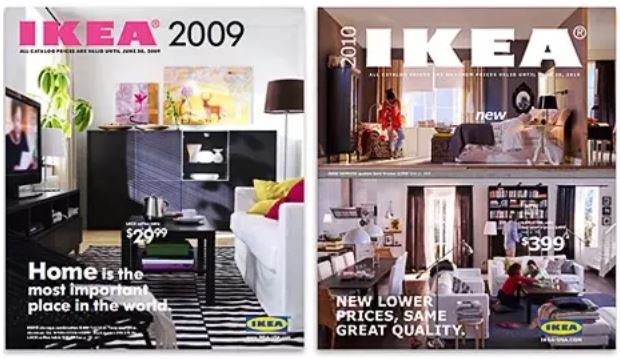
    People have been commenting on the change of font used by IKEA for their catalogs since August, when the new catalog came out. IKEA had used the Futura font for 50 years, but made the decision to adopt Microsoft’s Verdana font this year. Apparently, because it translates well to numerous languages.  Take a look at the two catalog examples in this picture.  Ignoring that the too-busy 2010 cover looks like they are trying to appeal to the attention-deficit generation,  the 2010 catalog could be anybody’s while the 2009 catalog is distinctively IKEA.  If you took the brand-name off the catalog, you’d know exactly whose it was.

    IKEA font

    This is important because design is about more than a satisficing appearance. We tend to mock style over substance, but style plays another role in design. It reinforces the emotional response to artifacts that we have and it provides us with clues (affordances) that tell us how to respond to those artifacts. There is an aesthetic to design that makes the difference between something that is a joy to use and something that just does the job. Sometimes that aesthetic is as simple as the tactile response to a Pilot G2 pen (one of the mundane artifacts that tends to rouse a lot of passion in its users). Sometimes it is the lack of cognitive effort in being able to distinguish the utility of one artifact over another because of its appearance. Sometimes, it is just the comfort of recognizing a familiar artifact, that one knows how to use.

    For all of these reasons, IKEA’s decision seems stupid. They had a brand recognition that people would die for, based on the use of the Futura font. Yes, this may be a sad thing to obsess over. But the familiarity and distinctiveness of the IKEA catalog is gone. And I, for one, mourn its passing.